Computer Science > QUESTIONS & ANSWERS > Intuit QuickBooks Certified User (QBCU) Exam Already Passed (All)
Intuit QuickBooks Certified User (QBCU) Exam Already Passed
Document Content and Description Below
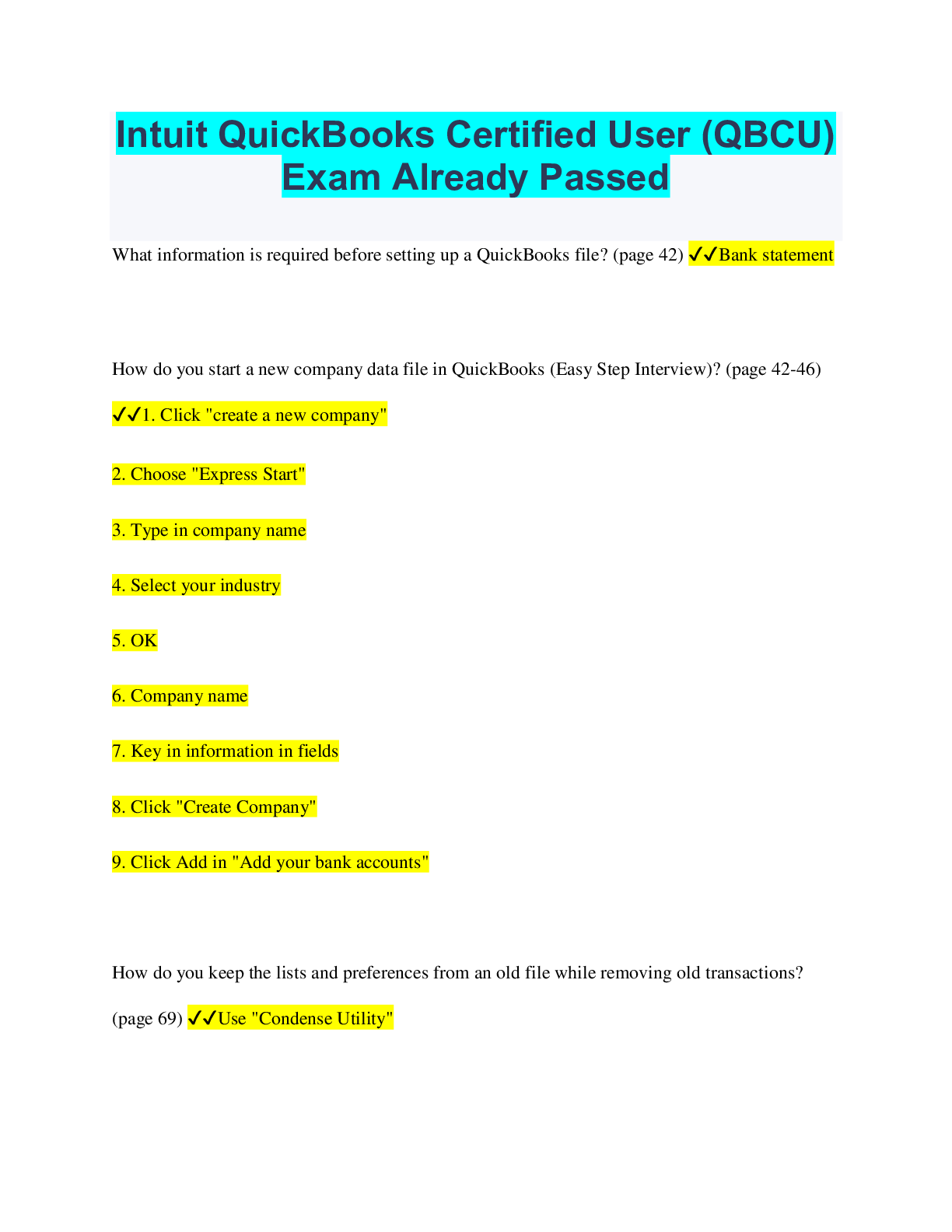
Intuit QuickBooks Certified User (QBCU) Exam Already Passed What information is required before setting up a QuickBooks file? (page 42) ✔✔Bank statement How do you start a new company data file ... in QuickBooks (Easy Step Interview)? (page 42-46) ✔✔1. Click "create a new company" 2. Choose "Express Start" 3. Type in company name 4. Select your industry 5. OK 6. Company name 7. Key in information in fields 8. Click "Create Company" 9. Click Add in "Add your bank accounts" How do you keep the lists and preferences from an old file while removing old transactions? (page 69) ✔✔Use "Condense Utility" How do you customize the home page? (page 6) ✔✔1. "Edit" 2. Preferences 3. Company Preferences How do you navigate/move around QuickBooks? ✔✔On the Home Page, click on the Vendors button How do you backup/restore a data file? (page 66 & 67) ✔✔File menu, "Backup company", "Local Backup", Next, Save it Now, Next, choose the location, Save File menu, "Open or Restore a Company", "Restore a backup company", Next, Local Backup, Next, Select the file, open How do you determine the release number and update QuickBooks? (page 4) ✔✔F2- this opens the product information window How do you use QuickBooks in single-user and multi-user mode? (page 70) ✔✔File pull-down menu --> Switch to Multi-User or Single-User mode What versions and editions of QuickBooks are available for a specific year? (page 2) ✔✔QuickBooks, QuickBooks Pro, QuickBooks Pro/Premier, and QuickBooks Enterprise How do you use a password to protect QuickBooks? (page 61) ✔✔1. Company menu 2. Set Up Users and Passwords 3. Set up Users 4. Password/Confirm Password How and why do you use preferences? (page 49) ✔✔They can be set in a new or existing company to make your work in QuickBooks function more efficiently. 1. Edit pull down menu, Preferences, General 2. My Preferences tab 3. Edit preferences then click OK to leave Preferences How do you merge entries? (page 38, 105, 117) ✔✔"Customer Center", right click on Customer List, New Customer, create new customer, open different customer and change to same name, the merge prompt will appear, "Yes" What are the different types of items and when do you use each type? (page 141) ✔✔Service (repairs/installation), non-inventory part (tangible that you purchase and/or sell and do not track inventory), inventory part (tangible that you track inventory), inventory assembly (individual items combined and sold as one), other charge (freight, shipping, etc.), and sales tax (tax on item) Who should be listed in the Customer Center? (page 94) ✔✔Any person who pays the company for services rendered or items purchased How do you navigate and use the customer center? (page 95) ✔✔"Customer Center", click inside the Search box, type, click the X to return to the customer list How do you complete the workflow from the sale making the deposit for invoicing (A/R)? (page 125) ✔✔Enter bill, pay bill, write check Sales receipt (no A/R)? (page 129) ✔✔"Reports" menu, "Venders & Payables", A/P Aging Summary, pay any unpaid bills How does QuickBooks use the Undeposited Funds, Accounts Receivable, and checking accounts in the invoicing cycle? (page 152) ✔✔All of the accounting is done "behind the scenes" in QuickBooks. When you receive a payment against a customer invoice you are increasing undeposited funds. Income or Sales should be credited and Cash or Checking should be debited. How and why do you record a customer credit? (page 168-169) ✔✔1. Plus Sign (+) 2. Receive Payment 3. Complete fields 4. Select invoice you want to apply the credit memo against 5. Select credit memo you want to apply credit memo for How and why do you create statements? (page 104) ✔✔"Customer Center", right click, Create Statement A statement can be e-mailed if the customer needs to see a list of historical transactions or if the customer is late on a payment. How do you handle a bounced check (NSF)? (page 82) ✔✔Contact the customer and inform them, then send the customer a revised invoice with an NSF fee. [Show More]
Last updated: 2 years ago
Preview 1 out of 5 pages
Buy this document to get the full access instantly
Instant Download Access after purchase
Buy NowInstant download
We Accept:

Reviews( 0 )
$10.00
Can't find what you want? Try our AI powered Search
Document information
Connected school, study & course
About the document
Uploaded On
Jul 08, 2023
Number of pages
5
Written in
All

Additional information
This document has been written for:
Uploaded
Jul 08, 2023
Downloads
0
Views
100




.png)