Final Project Milestone One: Modifying the Checkers Code
For this assignment I was tasked with taking screenshots of the Checkers game code in
the course’s Codio learning environment and analyzing what the snippet do
...
Final Project Milestone One: Modifying the Checkers Code
For this assignment I was tasked with taking screenshots of the Checkers game code in
the course’s Codio learning environment and analyzing what the snippet does and proposing a
modification that could be used to make the game better or play differently using the concepts of
AI programming.
Due to the structure of the Codio learning environment, it was difficult taking screenshots
of long lines of code, as such, I used the “CTRL and -“ shortcut to make the tab screen smaller
in Chrome so that I could fully capture a series of full lines. This might make certain screenshots
harder to read.
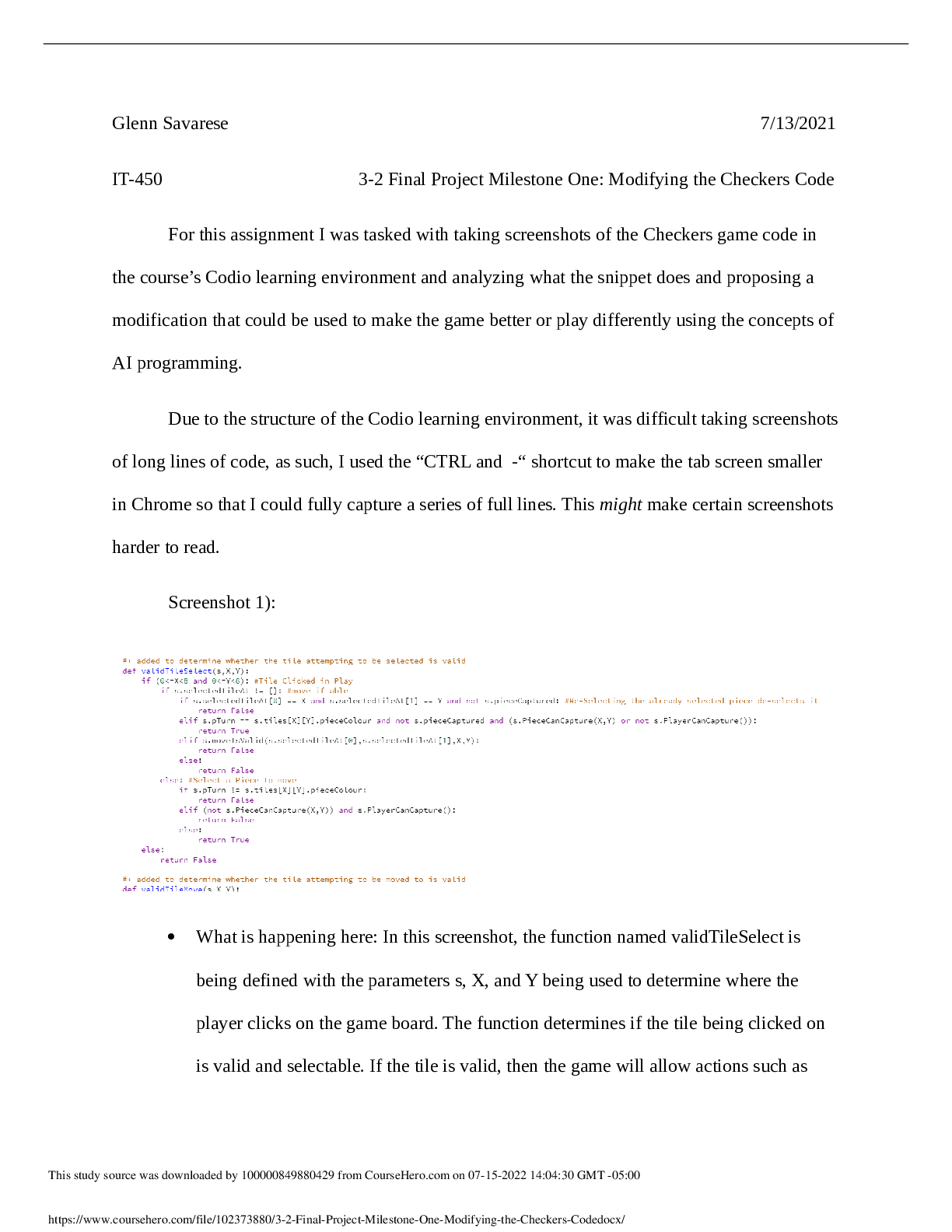
Screenshot 1):
What is happening here: In this screenshot, the function named validTileSelect is
being defined with the parameters s, X, and Y being used to determine where the
player clicks on the game board. The function determines if the tile being clicked on
is valid and selectable. If the tile is valid, then the game will allow actions such as
\Modifying-the-Checkers-Codedocx/moving pieces, capturing pieces, and making kings to happen. If the tile is invalid,
they cannot select it.
Proposed change: It would be beneficial to highlight or change the color slightly of
tiles that can be selected. This would make the game easier to understand for novice
users who may not have many experiences playing checkers. I would change the
color value of the tile that is selectable temporarily and change back to the original
white or red values after the move is completed.
Screenshot 2):
What is happening here: In this screenshot, the function named validTileMove is
being defined with the parameters s, X, and Y as its parameters used in determining
where the player clicks on the board. This function determines whether the tile chosen
by the player when they click one is valid using true or false values. If true, the player
can select the tile and continue gameplay, if false, they cannot do this.
Proposed change: This change applies to both validTileSelect and validTileMove as
they work in tandem to create base level game functionality. I propose making tiles
that can be selected and moved to “highlighted” by changing the color value of the
tiles that can be selected and moved to.
Screenshot 3):
Modifying-the-Checkers-Codedocx/ What is happening here: In this screenshot, the function named moveIsValid is being
defined with the parameters s, x, y, X, and Y being used to determine the starting and
ending X and Y values that hold where the player clicks in the playable area.
moveIsValid works in tandem with validTileSelect and validTileMove to determine
whether the player can successfully move a piece on the board. It handles the logic of
gameplay in this area by using PieceCanJump (see next entry)) and CanDoWalk (king
forward and backward movements).
[Show More]